—
Every SVG, DXF, STL and STEP file exported from this tool contains its design's settings — both gears and the drive. Selecting one here reads them and puts the page back as it was when the file was downloaded. Import is a step like any other: Undo takes it back.
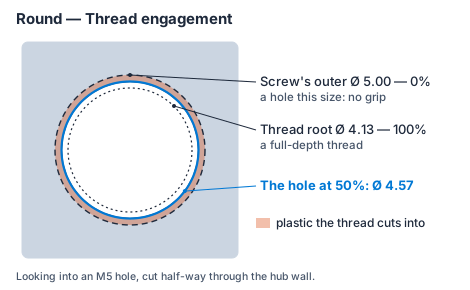
How tight a hole a set screw cuts its own thread into — it depends on your printer and filament, not on the gear. It applies to every set screw held by its own thread, on both gears, and is saved with each design; new designs start from your default. Captured-nut screws pass through a plain clearance hole and heat-set inserts use the hole you enter, so these settings don't change them.
The most torque the hub pins carry from the gear to a part pinned against one of its faces — a flange, a pulley, another gear. Three things can give: the pins shear where gear and mating part meet, or they crush the holes in the gear or in the mating part. The lowest of the three, over the safety factor, is the maximum operating torque.
Material values are typical (estimates), for parts printed flat as this app makes them; bearing is taken as the printed walls' tensile strength. Printed plastic creeps under a steady load, so keep the safety factor up for a constant torque. The gear's own drive to its shaft (bore, key, flat or set screw) and the teeth are not rated here — the Strength check rates the teeth.